PHP2Shell: Critical Remote Code Execution Vulnerability (CVSS 9.2) and How to Mitigate It
Two critical vulnerabilities (CVSS 9.2) in PHP allow unauthenticated remote code execution across versions back to PHP 5. Here is the technical breakdown, immediate mitigations, and upgrade roadmap.
By Conciptual Ltd
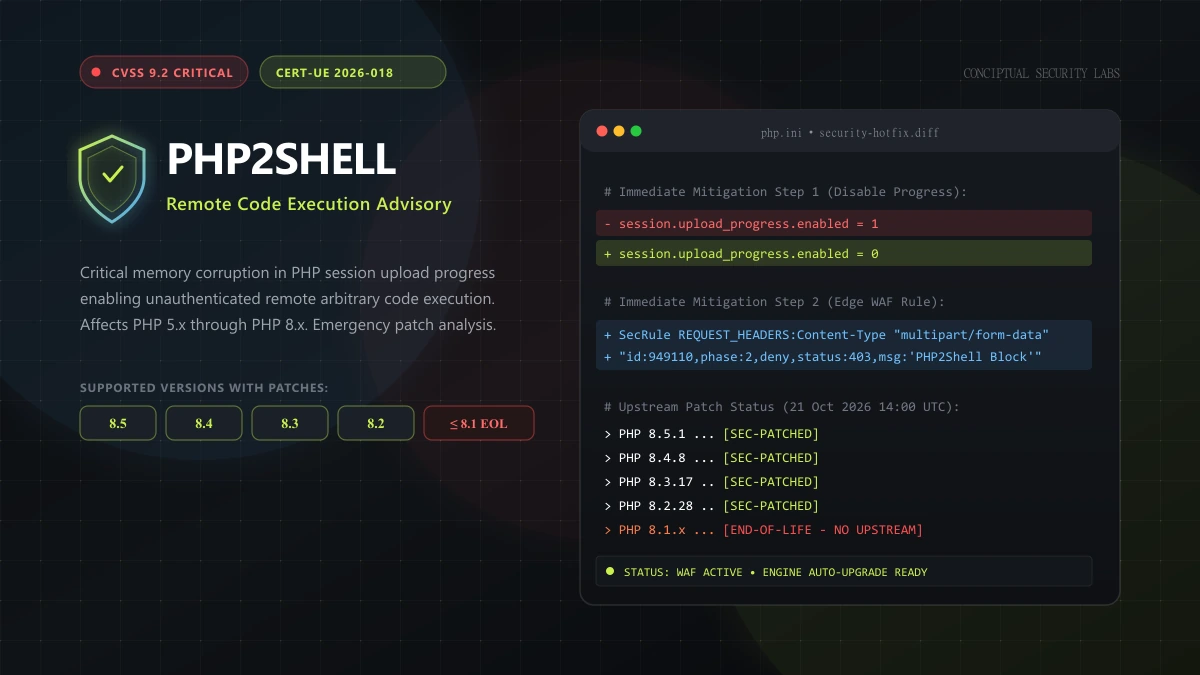
On October 21, 2026, the PHP core security team announced coordinated patches for two critical security vulnerabilities carrying a severity score of CVSS 9.2. Informally tracked as php2shell, the flaws allow an unauthenticated remote attacker to execute arbitrary system code on servers running PHP.
A security advisory issued by the Computer Emergency Response Team for the European Union (CERT-UE Advisory 2026-018) warns that the underlying vulnerability pattern extends across nearly the entire modern history of the language, potentially exposing servers running versions dating as far back as PHP 5.
If your business infrastructure powers web applications, APIs, or content management systems on PHP, immediate action is required. Here is a technical breakdown of the vector, immediate interim mitigations, and what engineering teams must execute today.
1. The Vulnerability: How PHP2Shell Works
While detailed proof-of-concept exploits were initially held back to allow hosting providers and system administrators time to remediate, the core attack surface targets PHP’s native session upload progress handler combined with multipart request parsing.
The Mechanism
In default configurations, PHP enables session.upload_progress.enabled. When an HTTP multipart/form-data POST request is transmitted, PHP’s engine monitors the progress of uploaded files by writing data into the $_SESSION superglobal before the script execution begins.
The vulnerabilities (evaluated at CVSS 9.2) stem from a flaw in how the engine handles buffer offsets and serialized session tracking variables during concurrent multipart stream processing:
- Manipulated Request Headers: An attacker transmits specifically crafted multipart form payloads with serialized session keys designed to trigger buffer desynchronisation.
- Memory Corruption: A race condition in the stream allocation layer corrupts internal pointer structures within the running PHP-FPM or Apache worker process.
- Execution Hijack: By chaining this heap corruption with environment variables or temporary file path manipulation, the attacker hijacks execution flow, leading to Remote Code Execution (RCE) under the privileges of the web worker (typically
www-data,nobody, ornginx).
Because this evaluation occurs at the engine level prior to framework routing, traditional application-level defenses (such as Laravel middleware or WordPress sanitation hooks) cannot intercept the exploit before it touches the engine.
2. Immediate Mitigations: What to Do Right Now
If you cannot immediately reboot services or recompile your runtime, execute the following three lines of defense:
Step 1: Disable Session Upload Progress in php.ini
If your web applications do not strictly rely on PHP’s legacy native upload progress bar mechanism (modern frontends almost universally track upload progress through client-side XMLHttpRequest or Fetch streams), disable the feature globally:
; In your /etc/php/{version}/fpm/php.ini and cli/php.ini
session.upload_progress.enabled = Off
After modifying your configuration, reload your PHP-FPM service:
# Example for systemd on Ubuntu/Debian
sudo systemctl reload php8.4-fpm
Disabling this directive neutralises the primary entry point without impacting normal file uploads.
Step 2: Deploy Edge Web Application Firewall (WAF) Rules
If your traffic routes through Cloudflare, AWS WAF, or an upstream reverse proxy, ensure your edge inspection rules scrutinise multipart/form-data POST payloads. Block requests where:
- The
PHP_SESSION_UPLOAD_PROGRESSkey contains non-alphanumeric or path traversal sequences (../, null bytes%00, or executable patterns). - Request headers exhibit malformed chunk boundaries or conflicting
Content-Lengthdefinitions.
On Nginx or ModSecurity, you can drop suspicious requests before they reach the backend socket:
# Drop requests attempting upload progress session manipulation
if ($request_body ~* "PHP_SESSION_UPLOAD_PROGRESS.*(\.\.|\%00|\/tmp)") {
    return 403;
}
Step 3: Harden Temporary Directories
Ensure your operating system mounts /tmp and file upload storage locations with noexec options, preventing injected binaries or scripts from executing directly from transient storage.
3. Upstream Patch Status & The End-of-Life (EOL) Trap
The upstream PHP maintainers released coordinated security builds at 14:00 UTC on October 21, 2026:
| Branch | Security Status | Action Required |
|---|---|---|
| PHP 8.5 | Fully Supported | Update to latest maintenance release |
| PHP 8.4 | Fully Supported | Update to latest maintenance release (Recommended) |
| PHP 8.3 | Security Fixes Only | Update to latest maintenance release |
| PHP 8.2 | Security Fixes Only | Update immediately (Support terminates Dec 31, 2026) |
| PHP 8.1 & Older | END OF LIFE (EOL) | No upstream patches will be provided |
[!WARNING] According to the official PHP Supported Versions Schedule, PHP 8.1, 8.0, 7.x, and 5.x are officially End-of-Life. Upstream maintainers will not release patches for these versions. PHP 8.2 is approaching its final cutoff on December 31, 2026.
If your systems are still operating on PHP 8.1 or older, you are operating on rented time. Security backports provided by Linux distributions (e.g., Debian LTS or Ubuntu Pro) may mitigate known triggers, but full architectural security requires upgrading your runtime to PHP 8.4 or 8.5.
4. Responsibility Model: Managed Hosting vs. Self-Managed VPS
Remediation pathways depend heavily on your hosting architecture:
Managed Cloud Platforms
For businesses hosting on fully managed cloud infrastructure:
- Security patches, kernel updates, and upstream binary backports are implemented automatically at the hypervisor and container tier.
- Edge WAF policies are pushed universally without requiring manual intervention from your team.
- No client-side downtime is experienced.
Self-Managed VPS & Dedicated Instances
For teams operating their own Virtual Private Servers (VPS), AWS EC2 instances, Hetzner, or DigitalOcean droplets:
- Patching is entirely the client’s responsibility.
- You must manually update your package managers (
apt update && apt upgrade,yum update), restart daemon processes, and audit custom Docker containers. - If running unmaintained legacy applications, you must test theme, plugin, and extension compatibility in a staging environment prior to switching production runtime versions.
5. Upgrade Checklist for Engineering Teams
Before switching your PHP version across production environments, follow this disciplined four-step deployment checklist:
- Verify Backups: Take full filesystem and database snapshots. Verify that your recovery time objective (RTO) is tested.
- Static Code Analysis: Run your codebase against PHP Compatibility tools (
phpcswithPHPCompatibility) to detect deprecated functions, type incompatibilities, or breaking syntax changes between PHP 8.1 and 8.4+. - Staging Verification: Deploy the target PHP runtime on a mirrored staging instance. Audit error logs (
error_log) withE_ALLreporting turned on to capture deprecation warnings. - Switch & Monitor: In your hosting panel (e.g. Web Tools > Change PHP Version) or container tag deployment, switch the production version to PHP 8.4 or 8.5, and continuously monitor server APM telemetry for latency spikes or 5xx response codes.
Official Sources & Advisories
For verified documentation and technical bulletins, consult the official authorities:
- Official PHP Supported Versions Roadmap
- Official PHP End of Life (EOL) Reference
- CERT-UE Security Advisory 2026-018
Need assistance auditing your server fleet, hardening cloud infrastructure, or migrating legacy codebases to modern secure runtimes? Contact Conciptual Ltd to consult with our senior cloud and software engineers.